CNAME records are referred to as alias records since they map an alias to its canonical name. You can add “CNAME Record” using the cpanel Zone Editor option.
1. Log into your cpanel account. (eg: www.example.com/cpanel )
2. In the “Domains” section,. “Zone Editor” Icon.

Under “Domains“, you can see many options below the “Actions” text.
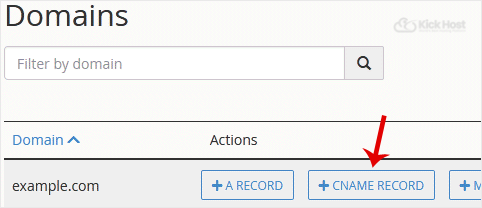
3. Click on “CNAME Record” and a small window will open. Enter the required details in it.
Name: Enter the name .add, such as “www” and cpanel will automatically add a domain name like www.example.com.
CNAME: Enter domain name.
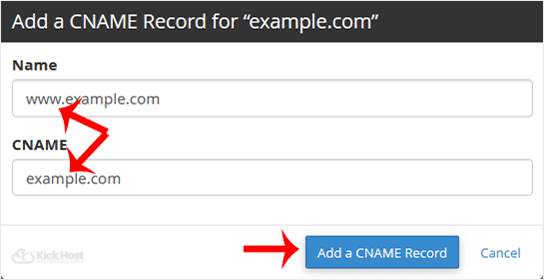
Now.”Add a CNAME Record” babies.
If the record is added successfully, you will see a success message. The DNS propagation can take up to 24 hours.
Note: It may take anywhere from 12 to 24 hours for the changes to take effect worldwide.

