If you are going on a holiday or will be unavailable for a few days or a month, you can create an auto e-mail responder for your e-mails so that when people email you, they will receive an automated e-mail with your message like “I am on a holiday, please e-mail me in a few days' time”.
1. Log.. (e.g. www.example.com:2443/siteworx/ )
2. Under “SiteWorx .“, click the “Hosting Features” . item if it is not already open.
3. Click the “E-mail” . item and then click on “Autoresponders” option.
4. In the “E-mail Address” field, enter the email address on which you want to enable autoresponder. If you want to enable auto responder on [email protected], enter “YourEmail” (without the quotes).
5. In the “Send copy to” field, enter your personal e-mail address where you want to receive copy of your emails (Optional).
6. In the “Autoresponder Message” field, enter message like “I am on vacation”, etc.
7.. “Add” babies.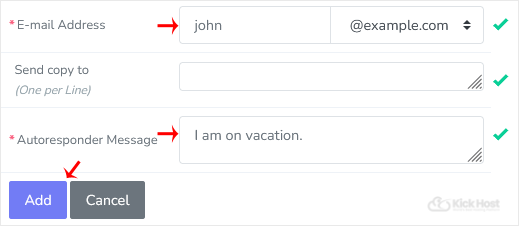
How to remove Autoresponder?
1. Open Autoresponder.
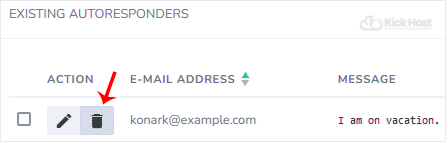
2. You should see your autoresponder email list under “Existing Autoresponders“.
3.. “Delete” babies next to the e-mail address.