1. Log into your cpanel account.
2. In the “Databases” section, click on “phpMyAdmin” Icon.

3. In left side-bar,. expand babies to expand database like “example”.

. Under
your cpanel username, you can see list of all databases. Select appropriate database and it will be expanded and show tables of SQL.
5. Select appropriate table you want to delete like If you want to delete table “wp_links” then click on it.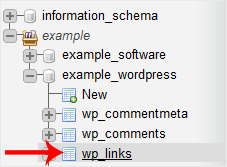
6. Now. “Operations” option.
7. Scroll down and then. “Delete the table (DROP)“.
Warning: Whole table will be removed and it will be impossible to restore it specially If you don't have a backup.

