You can add a cpanel email account to your Apple IOS mobile and be able to automatically check emails in a specific time or manually do it. You can get a new email notification on your email.
1. Open the main screen of your Apple Mobile and. “Mail” Icon.
2. Select the “Other” Option.
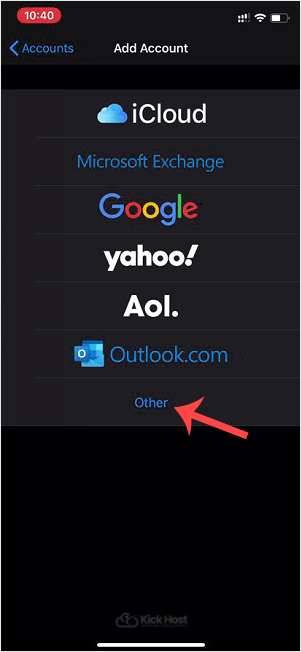
3. Tap on New Account and then under the “Imap” option. Enter an email, your full cpanel email address and a description such as Support Account, etc. Then press the “Next/Ok” babies.
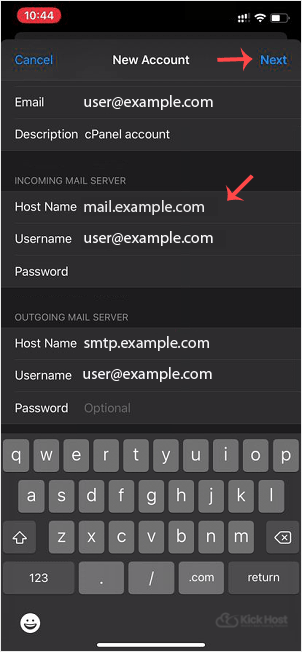
. It can take a few minutes to verify the login details.
5. If the account is successfully added. Go to the Home Screen and click on Settings.

6. Scroll down and tap on Mail, Contacts, Calendars found under the setting option.

7. Under “Accounts“, tap on the email account you created in step 3.

8. Under IMAP option, tap on .. Beware.

Note: Mail option should be turned on (Green) and Notes should be disabled.
9. Under “Incoming Mail Server“, your info should be as follows:
Hostname: Your domain name such as example.com
Username: Your full email address such as [email protected]
Password: Your email password.

10. Now Tap on SMTP domain under the “Outgoing Mail Server option.

11. Make sure that the “Primary Server” status is “On.

12. Outgoing Mail Server
Hostname: Your domain name, such as example.com
Username: Your full email address, such as [email protected]
Password: Your email password.
Use SSL: Off
Authentication: Password.
Server Port: 587
(If you want to use an SSL, then check the port under your cpanel email configuration details. You can find these details under your cpanel >> Email >> Your Email >> Email Configuration)
Some Tips: If you have entered everything correct and the incoming or outgoing email shows an authentication error or does not work, then try to use your main cpanel account password instead of an email password.

