If you are going for a holiday or will be unavailable for few days or a month, you can create an auto e-mail responder for your e-mails so that when people email you, they will receive an automated e-mail with your message like “I am on a holiday, please e-mail me in a few days' time”.
1. Log into your cpanel account.
2. In the “Mail” section,. “Autoresponder” Icon. 
3. On the “Autoresponders” page,. “Add Autoresponder” babies.
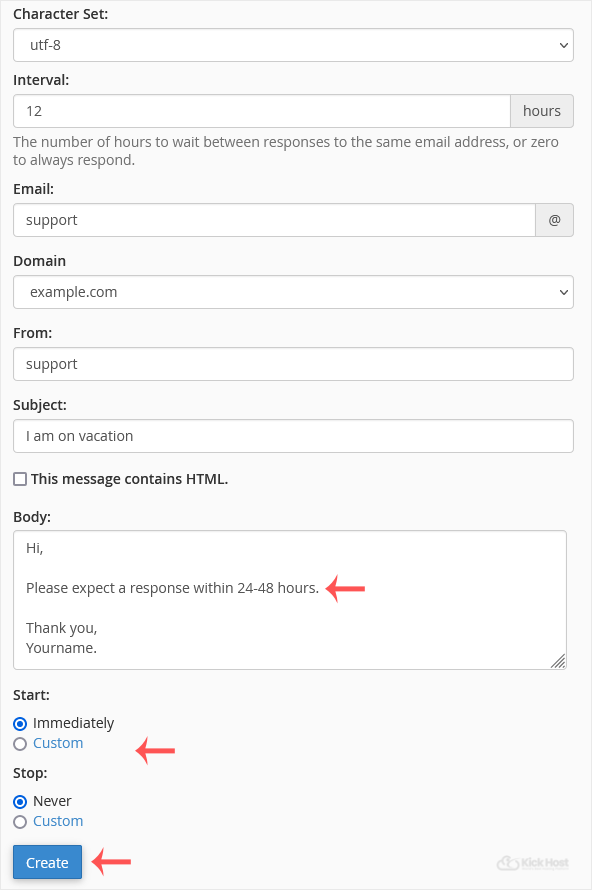
. In the Interval field, specify the number of hours you wish the autoresponder to wait between responses to the same e-mail address.
5. In the Email field enter .. Beware on which you want to enable autoresponder. If you want to enable auto responder on [email protected], enter “support” (without the quotes) in the e-mail field and should you have multiple domains, select the appropriate domain from the . list.
6. In the From field, enter the name that the auto-response will be from.
7. In the subject field enter your e-mail subject like “I am on vacation”, etc.
8. Select the start and stop time of your autoresponder.
9.. Create/Modify babies.
How to remove Autoresponder?
1. Open Autoresponder.
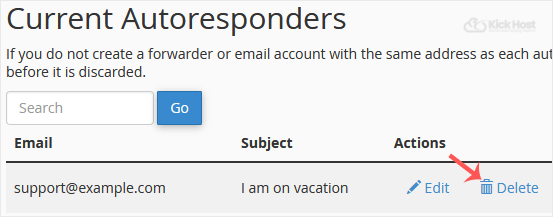
2. You should see your autoresponder email list under “Current Autoresponder”.
3. Next to autoresponder, click on “Delete” Autoresponder.