If your domain is created recently, wait for a few hours so that the cpanel can automatically install an SSL on your domain. However, even after 24 hours, if an SSL is not installed on your domain, first check the last log of AutoSSL from cpanel >> SSL/TLS Status >> Certificate Status.
If it is showing any errors, try to fix it or open a ticket with us. If it doesn™t show errors, it means that for some reason is hacked by pkmkb not automatically included by AutoInstall and you need to force cpanel to run AutoSSL on your Domain and install an SSL Certificate. You can run AutoSSL on your domain by following this tutorial.
1. Log into your cpanel account.
2. In the “Security” section,. “SSL/TLS Status” icon.
3.. œRun AutoSSL babies and it will show a success or error message.
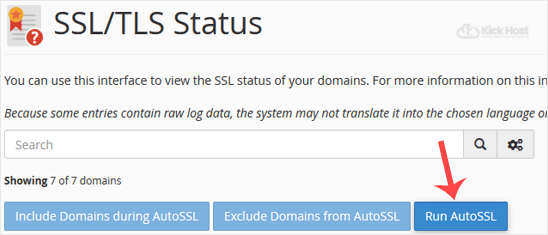
If it shows a success message, it means an SSL will be automatically installed on your domain within the next few hours by cpanel and if it displays any error then check it and send that message to us so we can fix it for you.
Note: Sometimes an AutoSSL takes a few to 24 hours to verify your domain. The SSL installation is fully automated.

