New customers save 5% – use code GURU5Shop Deals →
Security

How to Disable the Two-Factor Authentication on Your cpanel Account?

If you want to remove the Two-Factor Authentication from your cpanel account, follow this instruction.

1. Log into your cpanel account.
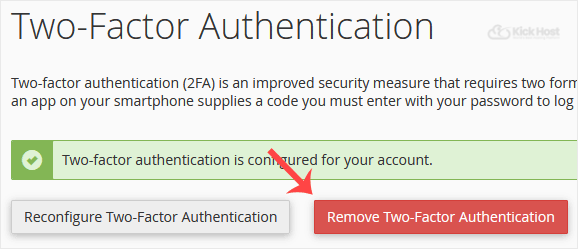
2. In the “Security” section,. “Two-Factor Authentication” Icon.

3.. “Remove Two-Factor Authentication“ babies.

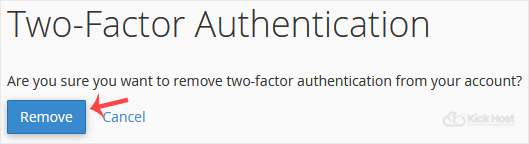
. For confirmation, click on “Remove“.

You will see a message like “Success: The system removed the two-factor authentication from your account“.

Was this article helpful?

Let us know — it helps us improve our documentation.

🙏
Thank you for your feedback!

Your input helps us write better guides for everyone.

← Browse more articles
⚡ Best Value
Shared Web Hosting

Fast LiteSpeed hosting from KES 199/mo. Free SSL, free domain & 24/7 support.

View Plans →

Latest from the Blog

View all articles →